10 Satellite Imagery Tools for Planners and Field Teams in 2026
Government urban planners and emergency management field teams operate on different clocks but face the same constraint, which is getting satellite imagery in front of the decision-maker at the right moment.
The category of satellite imagery tools has expanded well beyond a handful of expensive desktop GIS clients.
Today's lineup includes free global viewers used during active disasters, cloud-based analysis platforms that process petabytes of pixels in minutes, mobile apps that put tasked imagery into the hands of crews already on scene, and commercial platforms that unify access across dozens of satellite operators.
This guide ranks ten satellite imagery tools that hold up against the operational realities of public-sector work. Each entry covers what the tool does well, where it falls short, and which audience it serves best.
The list mixes commercial and free tools because both belong in any working planner's or responder's stack.
How We Ranked These Satellite Imagery Tools
Three audiences shape the rankings here, which are municipal and federal planners, emergency managers and field responders, and the GIS analysts who support both. The criteria reflect what those teams actually evaluate during procurement and during incidents.
Tasking and revisit options
The fastest way to separate serious tools from casual viewers is whether the user can order a new satellite collection over a specific area of interest (AOI). Most free tools cannot. Commercial platforms vary widely in how transparent and fast their tasking workflows are.
Sensor diversity across optical, SAR, and thermal
Sub-meter optical imagery is necessary but not sufficient. A tool that only offers optical falls flat when the AOI is under cloud cover or smoke, which is exactly when emergency teams need it most. SAR (synthetic aperture radar) and thermal sensors round out a real operational stack.
Pricing transparency and licensing
Public-sector procurement teams reject tools that hide pricing behind sales calls. Per-square-kilometer or per-scene pricing with clear licensing terms speeds up small purchases and pilots.
GIS integration and data delivery
Imagery that cannot reach an analyst's GIS environment in a usable format is just a pretty picture. The tools below were evaluated on STAC API support, Cloud-Optimized GeoTIFF (COG) delivery, and direct delivery to AWS, Google Cloud, and Azure.
Web-based satellite imagery platforms versus mobile satellite imagery apps
Desk-bound planners and field-deployed responders need different things from the same imagery library. Tools that work well in both contexts score higher.
Suitability for government urban planning and field team mapping
The final filter is whether the tool is realistically usable inside the procurement, security, and integration constraints of a municipal planning office, a state emergency management agency, or a federal response coordination team.
The 10 Best Satellite Imagery Tools for Government Urban Planning and Emergency Management
1. SkyFi
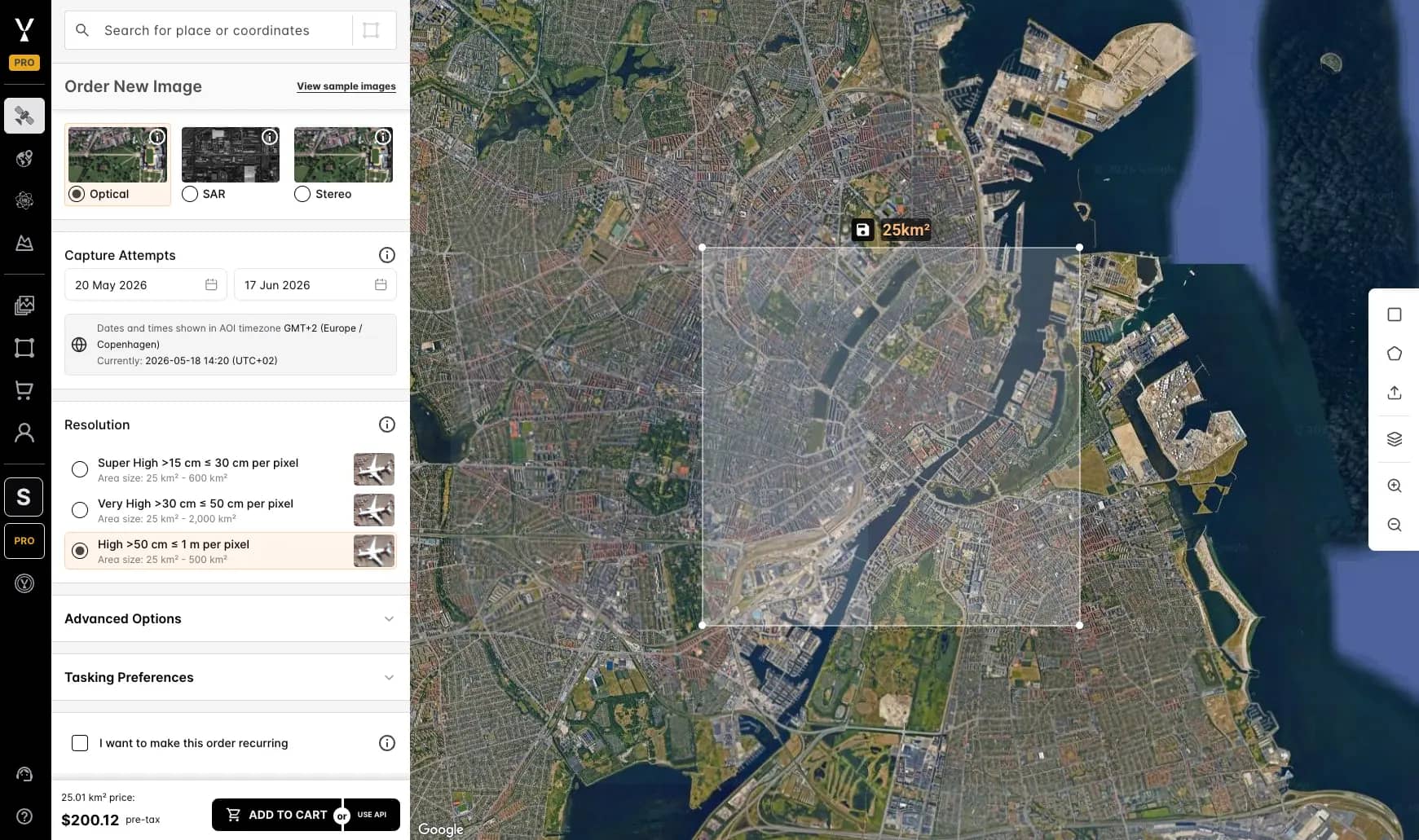
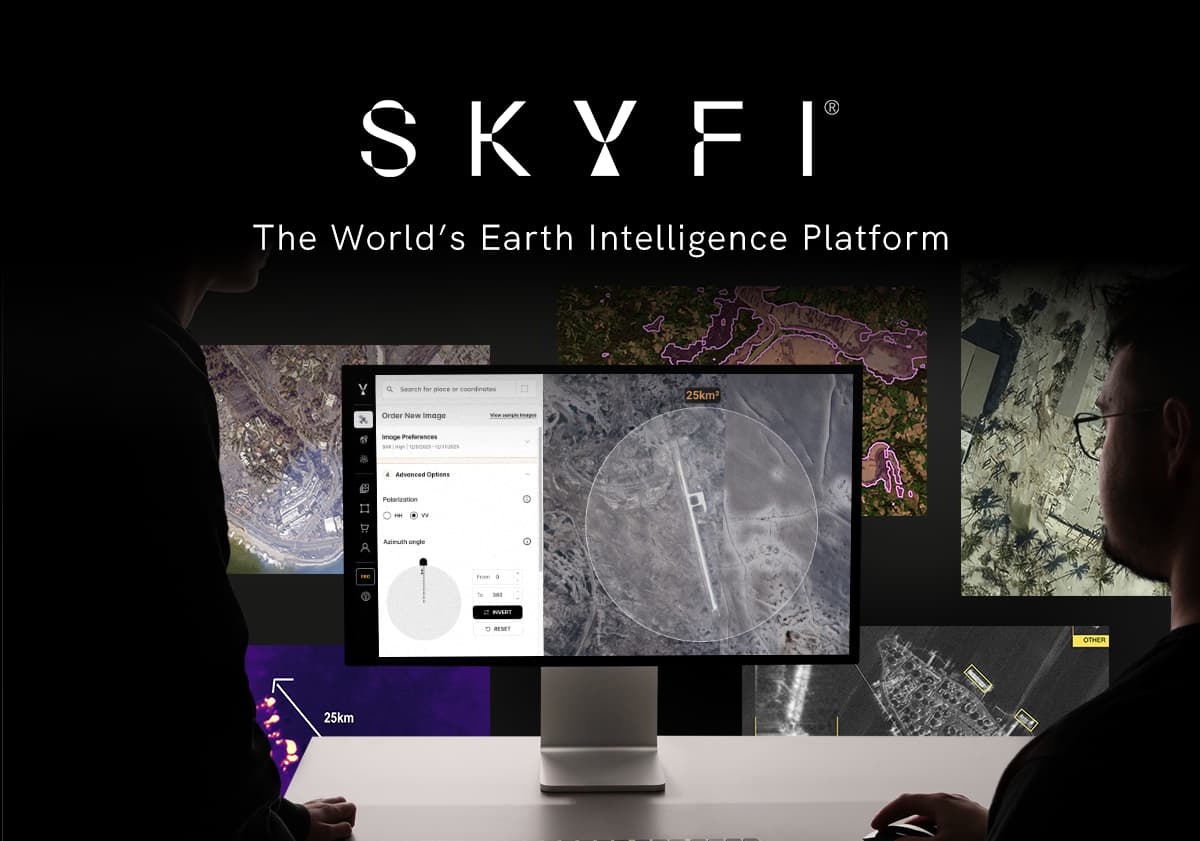
SkyFi is a unified Earth intelligence platform that gives planners and field teams access to more than 50 satellite imagery providers and roughly 204 sensors through a single web interface, iOS and Android app, API, and ATAK (Android Team Awareness Kit) plugin.
Users can search archive imagery, run satellite tasking for new collections, order SAR scenes from ICEYE and Umbra, and satellite-derived 3D products, all with transparent per-square-kilometer pricing and no subscription required.
Every order is delivered as a pre-processed, view-ready image alongside the raw files and full metadata. Teams without a GIS analyst can open the processed image immediately and drop it into a briefing or field report. GIS teams that need it get the raw scene and metadata for ArcGIS, QGIS, or cloud delivery to AWS, Google Cloud, or Azure.
For government urban planning, SkyFi's 3D and elevation products under Vivid Terrain support viewshed analysis, drainage modeling, and infrastructure planning. For emergency management field teams, the ATAK plugin and mobile app close the gap between command and crew.
For planning teams without a GIS analyst on staff, SkyFi recently launched Rowan, an AI navigator for geospatial and satellite data that makes the full platform accessible through plain language.
Planners and field teams can describe a monitoring objective, a location, or a question about a specific site and Rowan handles archive search, provider selection, and ordering, without requiring any technical background.
Best for: Teams that need one tool covering archive, tasking, analytics, SAR, and mobile access, with or without a GIS team.
2. NASA Worldview (Earthdata GIBS)
NASA Worldview is a free web viewer built on the Global Imagery Browse Services (GIBS) and is updated within hours of acquisition for many MODIS, VIIRS, and Landsat layers. It is the tool emergency managers reach for first when they need to see active wildfires, smoke plumes, dust storms, or post-storm flood extents at continental scale.
Strengths include a global view that updates daily, hundreds of preconfigured layers including thermal anomalies and aerosol indices, and a time slider for before-and-after comparison.
Best for: Continental and regional situational awareness during active events. Resolution maxes out around 250 meters, which limits its value for municipal-level urban planning.
3. USGS EarthExplorer
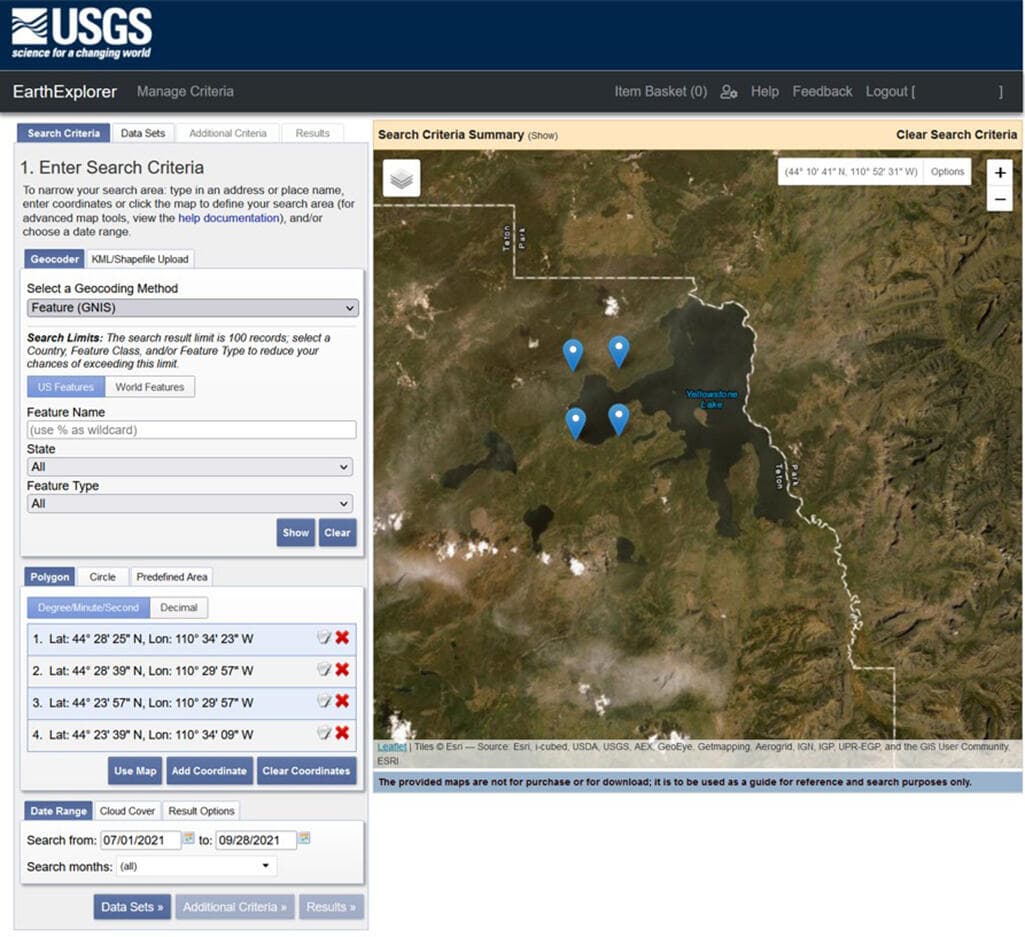
USGS EarthExplorer is the U.S. Geological Survey's free archive portal covering Landsat back to 1972, MODIS, ASTER, declassified intelligence imagery, and Sentinel data.
Planners use it for long-term land-use change analysis, historical baselines, and environmental review documentation.
The interface is functional rather than elegant, but it is the most authoritative source of free historical satellite imagery in existence. Bulk download and metadata-rich search are major strengths.
Best for: Multi-decade change detection, environmental impact studies, and any analysis where citeable government-sourced imagery matters.
4. Copernicus Browser
Copernicus Browser is the European Space Agency's free portal for the Sentinel constellation, including Sentinel-1 (C-band SAR) and Sentinel-2 (10-meter multispectral optical). It replaced the older Copernicus Open Access Hub in 2023 as part of the Copernicus Data Space Ecosystem.
For government urban planners, Sentinel-2 offers free 10-meter optical with a five-day global revisit. Sentinel-1 SAR is free, globally available SAR data, which makes it useful for flood mapping and surface deformation work.
Best for: Routine planning analysis and monitoring at 10-meter resolution and baseline SAR coverage that does not require commercial-grade detail.
5. Sentinel Hub (EO Browser plus APIs)
Sentinel Hub, now part of Planet through the Sinergise acquisition, takes the same Sentinel and Landsat archives and wraps them in a developer-friendly API plus a more polished web viewer called EO Browser.
It handles cloud masking, mosaicing, and on-the-fly processing that the official Copernicus Browser leaves to the user.
For GIS teams building remote sensing analysis pipelines, the OGC-compliant WMS, WMTS, and process APIs are the main draw. A free tier exists for small workloads.
Best for: Analysts who want programmatic access to free satellite data without managing terabytes of downloads.
6. Google Earth Engine
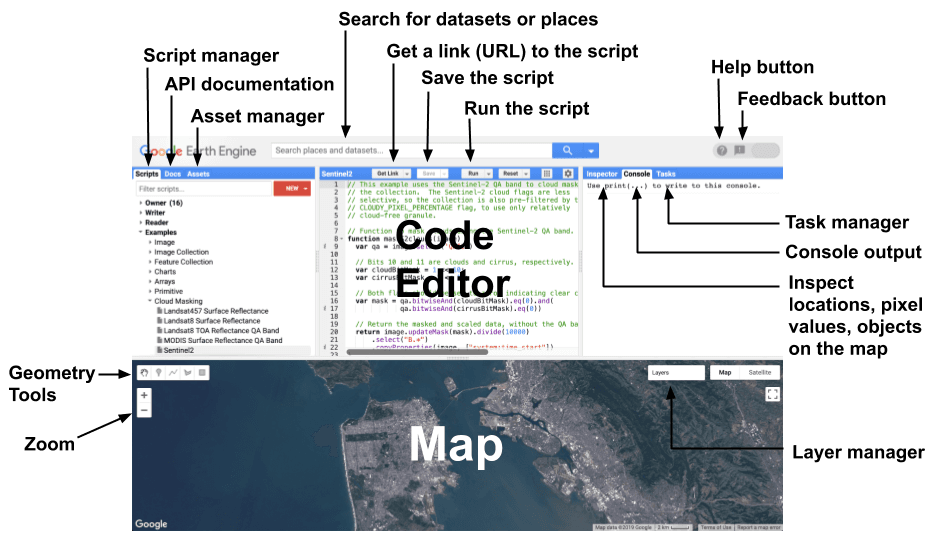
Google Earth Engine offers petabytes of public satellite data alongside Google's cloud compute, exposed through a JavaScript and Python API.
It is widely used for academic remote sensing research, large-area land-cover classification, and continental-scale change detection.
A commercial tier launched in 2023 makes Earth Engine viable for government agencies and enterprises, while a free tier remains for academic, research, and non-profit work. The learning curve is real, but the leverage is unmatched for any team doing remote sensing analysis across millions of square kilometers.
Best for: Developers, analysis at scale, especially environmental monitoring, climate work, and large-area change detection.
7. Google Earth Pro
Google Earth Pro is the free desktop viewer that almost every government employee has used at least once.
While it is not a serious analysis tool, it carries a few features that matter for planners, including a historical imagery slider, KML and KMZ import and export, basic measurement tools, and export of high-resolution screenshots suitable for public presentations.
For community engagement, council briefings, and quick reconnaissance, Earth Pro remains hard to beat on accessibility.
Best for: Public-facing planning briefings, quick visual reference, and basic field versus imagery comparison.
8. ArcGIS Living Atlas of the World
ArcGIS Living Atlas is Esri's curated catalog of authoritative geographic content, including imagery basemaps, Landsat and Sentinel layers, demographic data, and elevation surfaces.
Because the majority of government GIS shops run on ArcGIS, the Living Atlas is often the path of least resistance for getting satellite imagery into a working analytical environment.
It is not a satellite imagery procurement tool, but it is the bridge between commercial or free imagery and the rest of a planning organization's geospatial workflow.
Best for: Teams already invested in ArcGIS Pro, ArcGIS Online, or ArcGIS Enterprise.
9. QGIS with Semi-Automatic Classification Plugin
QGIS is the leading open-source desktop GIS, and the Semi-Automatic Classification Plugin (SCP) extends it with download, preprocessing, and supervised classification workflows for Landsat, Sentinel, and ASTER data.
It is the most-used free combination for serious remote sensing analysis outside of Earth Engine.
For agencies with budget constraints or open-source mandates, QGIS plus SCP delivers professional-grade capability without licensing costs. The trade-off is steeper setup and a smaller commercial support ecosystem.
Best for: Cost-constrained government teams, academic users, and analysts who prefer open-source workflows.
10. NASA FIRMS
NASA FIRMS (Fire Information for Resource Management System) distributes near-real-time active fire and thermal anomaly data from MODIS and VIIRS, typically within three hours of satellite overpass.
It includes a free web viewer, email alerts, and APIs that feed directly into dispatch and incident-management dashboards.
FIRMS is narrower than the other tools on this list, but it does its job better than anything else for the emergency management field teams that depend on it during wildfire season.
Best for: Wildfire detection, hazard monitoring, and any field operation where thermal anomaly alerts drive immediate response.
Web-Based Satellite Imagery Platforms vs Mobile Satellite Imagery Apps
The split between web-based satellite imagery platforms and mobile satellite imagery apps is not really about device but rather about context.
Web platforms win for analysis. A planner running multispectral classification, a SAR interferometry workflow, or a multi-AOI tasking order needs screen real estate, processing power, and a stable network connection.
NASA Worldview, Copernicus Browser, Sentinel Hub, Earth Engine, and the full SkyFi web platform apply to this.
Mobile apps win for the field. A damage-assessment crew rolling into a flood zone needs to pull recent imagery onto a tablet, confirm a coordinate, and feed observations back to command without round-tripping through headquarters.
SkyFi's iOS and Android app, combined with the ATAK plugin, is the only entry on this list built for that workflow end to end. NASA Worldview and Copernicus Browser are accessible from a mobile browser but were not designed for low-bandwidth field deployment.
For most public-sector teams, the right answer is a web platform for the analyst's desk plus a mobile app for the responder's pocket.
Frequently Asked Questions
What is the best mobile satellite imagery app for field teams?
For emergency management and defense field teams, the SkyFi mobile app combined with its ATAK plugin is the most operationally complete option, covering imagery search, tasking, and order management from a phone or tablet.
For situational awareness only, NASA Worldview through a mobile browser is a strong free alternative.
Which satellite imagery tools support tasking for government urban planning?
Commercial tasking is available through SkyFi for optical, SAR, multispectral, and aerial collections, with transparent per-square-kilometer pricing and tasking modes that include Next Available Capture, which delivers a guaranteed collection within 24 hours regardless of cloud cover.
Free tools like Copernicus Browser do not support tasking but provide scheduled revisit coverage from Sentinel-1 and Sentinel-2.
How do I access SAR imagery for emergency management?
Free C-band SAR is available from Sentinel-1 through Copernicus Browser or Sentinel Hub. For higher resolution and faster delivery, commercial X-band SAR from ICEYE and Umbra is accessible through SkyFi, with resolutions down to 25 centimeters and same-day collection options for active incidents.
Can satellite imagery tools integrate with ArcGIS and QGIS?
Most of the tools on this list integrate with both. ArcGIS Living Atlas is native to the Esri ecosystem, while QGIS handles standard satellite formats and supports plugins like SCP for direct download.
Commercial platforms including SkyFi deliver imagery as Cloud-Optimized GeoTIFFs that both ArcGIS Pro and QGIS open.
Are there free satellite imagery tools suitable for government use?
Yes. NASA Worldview, USGS EarthExplorer, Copernicus Browser, NASA FIRMS, and Google Earth Pro are all free and widely used by federal, state, and local government agencies.
Their main limitations are coarser resolution (typically 10 meters and lower), no tasking capability, and limited support for time-sensitive incident response.
SkyFi also provides direct access to Sentinel-1 SAR and Sentinel-2 optical as open data inside the same platform, which lets teams run routine monitoring on free imagery and order commercial high-resolution captures when an event demands it, without switching tools.
Choosing a Satellite Imagery Tool for Your Team
The right satellite imagery tool depends on what fails most often in your current workflow. If long-term archive access and open data are the bottleneck, the free tools on this list cover most of the ground.
If timely high-resolution imagery, on-demand tasking, SAR access, or field-team mobile access is the gap, a commercial platform that unifies all of those is the faster path than stitching together direct relationships with each operator.
SkyFi was built to be that unifying layer, with Earth observation data from more than 50 providers, mobile and ATAK integration for field teams, and transparent per-square-kilometer pricing that fits public-sector procurement constraints.
For planners and emergency managers evaluating satellite imagery tools in 2026, the practical question is no longer whether the data exists, but how efficiently it gets from orbit to the people who need it.
Mikkel Rasmussen is a Senior Remote Sensing Specialist at SkyFi, where he develops image processing methods, derived-data prototypes, and geospatial workflows that support scalable Earth observation products. With more than a decade of experience working across commercial and open-source satellite imagery, he collaborates closely with engineering, product, and UX teams to ensure efficient, operationally sound geospatial platforms.


