Managing geospatial data across a large organization has never been simple. When multiple colleagues, business units, subsidiaries, and field teams all need access to satellite imagery, but have different use cases, budgets, security requirements, and projects, most platforms force a painful choice: utilize one account with no sharing, or a tangle of separate accounts that nobody can oversee or coordinate. Without a centralized system, organizations risk creating siloed data, redundant spending, and bottlenecks that prevent teams from getting the insights they need.
SkyFi Enterprise Account Management
SkyFi enables a single source of truth for acquiring, analyzing, and sharing Earth observation (EO) data. Built from direct feedback from enterprise organizations including the world’s biggest financial services firms, energy companies, and agricultural conglomerates, SkyFi created a hierarchical, enterprise-grade organizational structure purpose-built for how large teams actually work with satellite imagery and analytics.
Organizations that harness geospatial intelligence gain a powerful competitive edge and this approach democratizes access, allowing everyone from GIS professionals to project managers to leverage valuable insights. It transforms your geospatial data from a niche, complex asset into an accessible, enterprise-wide resource that drives better decision-making and fosters innovation.
We designed the SkyFi platform to be the intuitive, powerful engine for your organization's EO needs. With an enterprise account, SkyFi acts as the company’s geospatial hub, simplifying every step of the process, from tasking a satellite to running advanced analytics, without the need for complex software or specialized expertise.
What Does SkyFi Enterprise Provide?
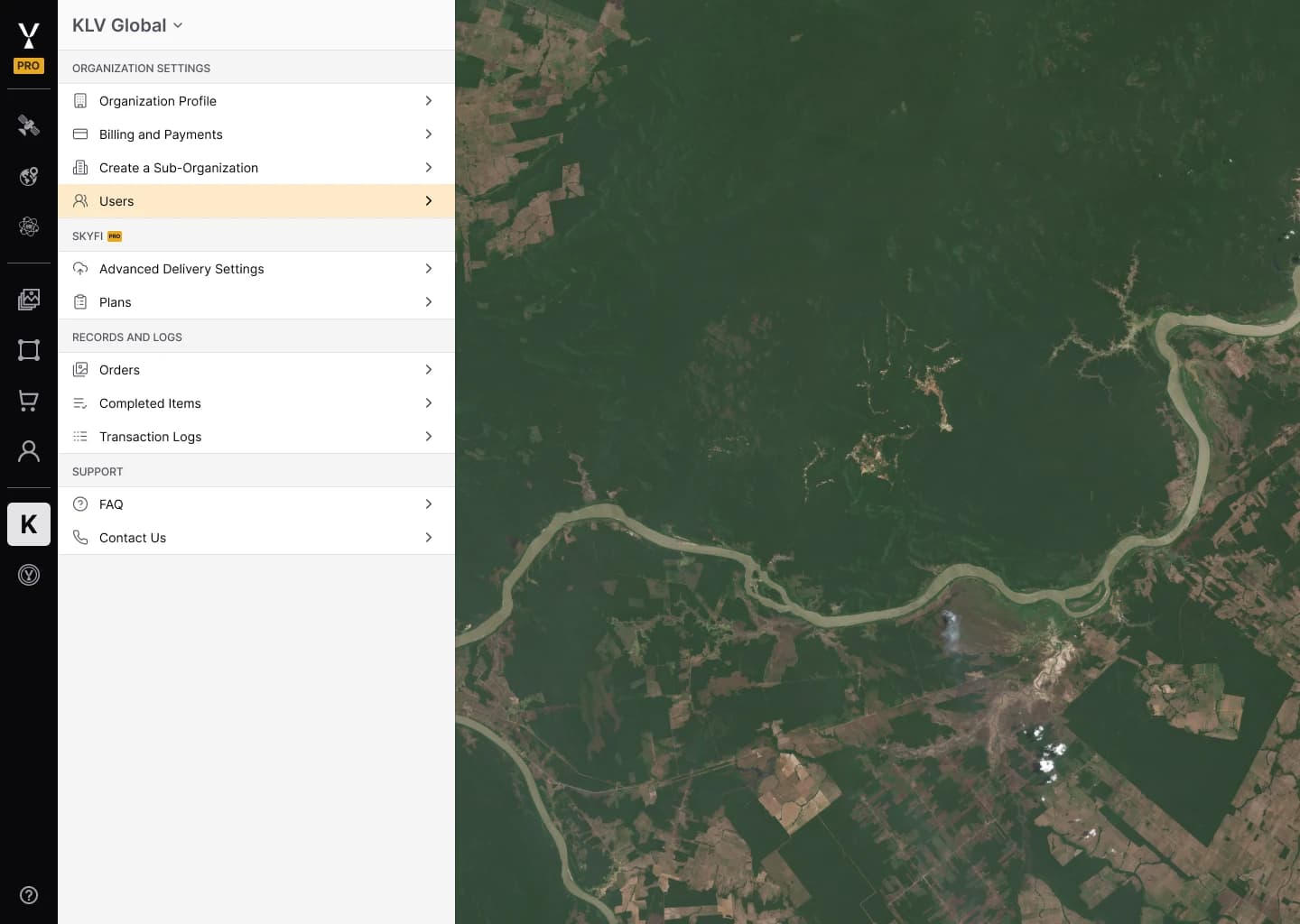
SkyFi allows enterprise customers to create a central organization account for managing users, payment, and imagery and analytics orders. Within this organization account, enterprises can enable sub-organizations, which are independent organizational units nested under the single parent SkyFi account. Think of them as self-contained teams or subsidiaries that share a common organizational umbrella while maintaining complete autonomy over their own users, budgets, and data.
Each sub-organization operates with its own user management, payment methods, and order history - fully isolated from sibling units. A parent organization can nest sub-organizations, supporting structures as simple as a two-team setup or as complex as a multinational with regional divisions, country offices, and project-specific squads.
SkyFi distinguishes between two types of sub-organizations: Teams (units sharing the parent’s web domain) and Subsidiaries (wholly owned entities with their own domain, like a regional energy provider under its national parent utility company). This distinction ensures that organizational structures in SkyFi mirror real-world corporate hierarchies.
The World’s Largest Virtual Satellite Constellation
SkyFi connects users to the world's largest network of satellite and aerial imagery providers, offering a diverse range of data types and specs to meet any project requirement. Through our single, easy-to-use platform, individuals and enterprise teams can access:
High-Resolution Optical Imagery: Crystal-clear satellite images with resolutions down to 30cm, or as crisp as 7.5cm for aerial data.
Synthetic Aperture Radar (SAR): The power to see through clouds and at night.
Multispectral Data: Uncover insights in agriculture, environmental monitoring, and more.
Open Data: Instantly access and analyze freely available datasets from Sentinel 1 and Sentinel 2.
Archival Data: Historical global satellite imagery from SkyFi’s partner archives.
On-Demand Analytics: Get needed answers quickly across a range of industries and use cases.
Enterprise-Grade Access Controls
SkyFi provides a role-based access model designed for the realities of enterprise governance:
Account Owners and Admins have full visibility across the entire organization and every sub-organization beneath it. They can create sub-organizations, manage users at any level, and place orders on behalf of any unit.
Sub-Organization Admins manage their own unit and any children sub-organizations nested below it, but cannot see sibling units. Members have visibility only within the specific sub-organization they’re assigned to. Users can belong to multiple sub-organizations simultaneously and switch between them seamlessly, a common need for analysts or project managers who work across divisions.
Complete Data Isolation Between Teams
For enterprises in regulated industries like energy, insurance, mining, financial services, data isolation isn’t optional. SkyFi enforces complete separation of orders, imagery, and transaction records between sibling sub-organizations. A user in one sub-organization cannot see the orders or spending activity of another sub-organization, even if both exist under the same parent account.
This design directly addresses compliance requirements that customer organizations raised during development. Admins at higher levels retain visibility downward through their branch of the hierarchy, but lateral visibility is blocked by default.
Transparent Budget and Payment Controls, Contract-Free Access
One of the biggest hurdles in enterprise geospatial management is unpredictable and prohibitive costs. Many platforms lock users into long-term contracts and require large, upfront financial commitments. In contrast, SkyFi pricing offers a transparent, contract-free, pay-as-you-go model.
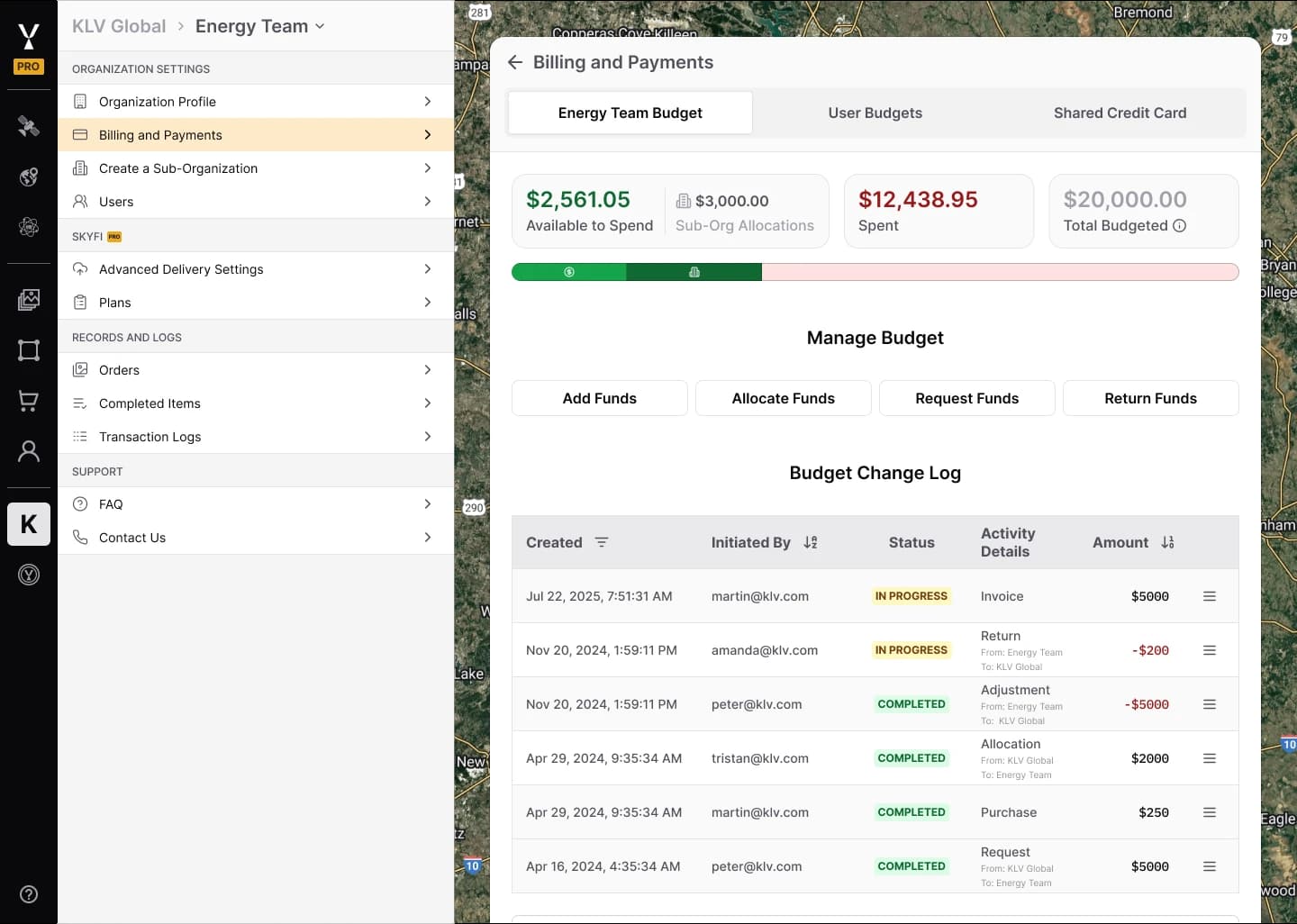
Every sub-organization in SkyFi operates with its own budget, enabled by default. Admins creating a sub-organization select payment method, whether that’s a shared corporate card, the parent organization’s budget, or the sub-organization’s own dedicated funding. Each unit carries its own billing address and tax information. Admins can also allocate funds to sub-organizations out of a centralized company budget.
At checkout, users assign orders to any sub-organization they belong to, and spending is tracked based on the used budget per order. Organizational admins can set individual spending budgets for members and define per-order spending limits for each member. Admins can also filter their My Orders view by sub-organization to monitor orders across the enterprise, and see detailed transaction history for each sub-organization. This level of financial granularity eliminates the reconciliation headaches that come with a single shared satellite data account while allowing for precise budget control and the elimination of expensive, unused data licenses. Now you can track spending across projects and users, ensuring every dollar delivers maximum ROI.
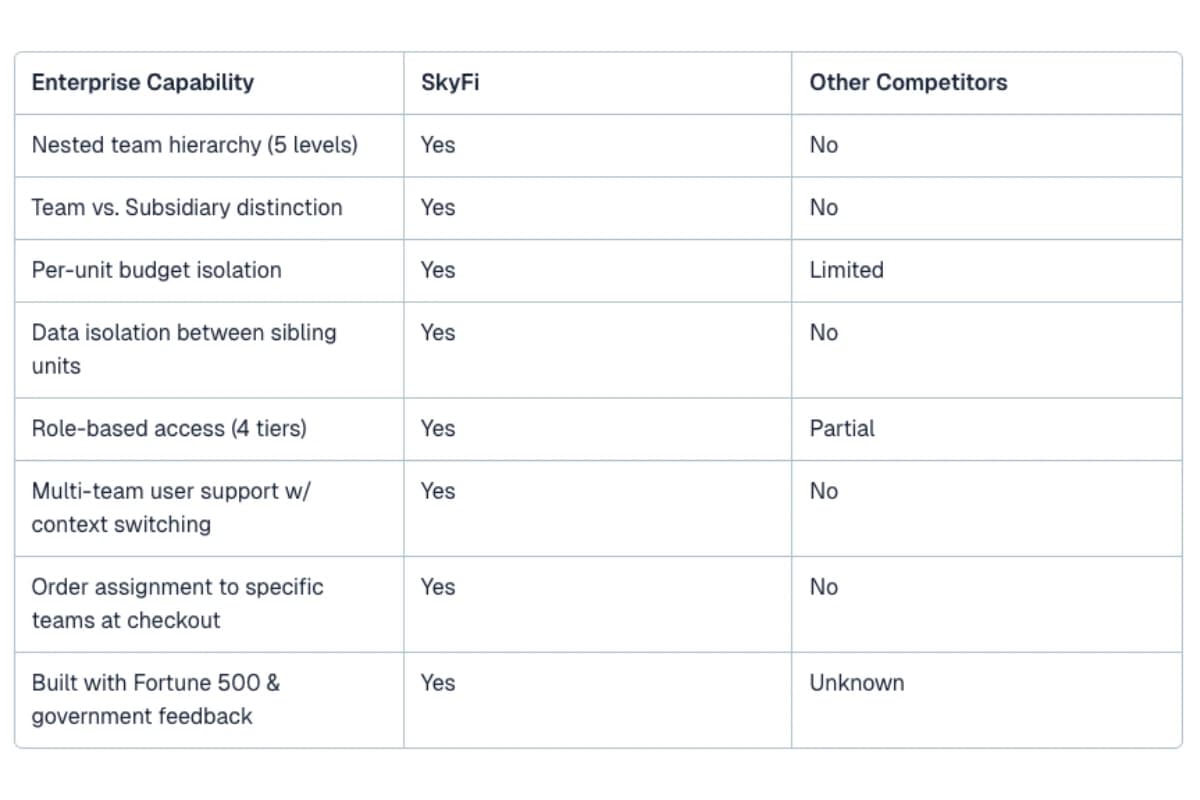
How SkyFi SubOrgs Compares to Other Satellite Platforms
Enterprise satellite imagery platforms vary widely in how they handle multi-team organizational management. Here’s how SkyFi’s features stack up against the competition:
Who Is This For?
SkyFi’s enterprise features were designed for organizations where geospatial data decisions are made across multiple teams, each with their own operational context. This includes multinational corporations managing geospatial data across regions and subsidiaries, defense and government agencies requiring strict data compartmentalization, agriculture, energy, insurance, and mining companies with site-specific imagery needs and separate budgets, and financial services firms using satellite-derived intelligence across independently managed funds or desks.
Integrate Seamlessly with Your Existing Tools
Your geospatial platform must integrate with the tools you already use. All data from SkyFi is delivered in standardized formats like GeoTIFF, ready for immediate use in leading GIS software. For organizations looking to build custom workflows, the SkyFi API offers a powerful solution for automating data acquisition and integrating Earth intelligence directly into your own applications and platforms.
Get Started with SkyFi Enterprise
Enterprise geospatial capabilities should be about more than just managing data; it's about unlocking new potential and empowering your organization to solve its biggest challenges. By simplifying access, providing cost transparency, and offering a powerful suite of tools for analysis, SkyFi provides enterprises with the foundation for a transformative Earth intelligence strategy.
Ready to see how an enterprise account can change the way your organization views the world? Create your account and start exploring today.
Still have questions? Book a demo to learn more.
FAQ Section
Recommend implementing as FAQ schema markup on the published page for enhanced AI/LLM citability and featured snippet eligibility.
Q: What are enterprise accounts on SkyFi?
A: SkyFi enterprise accounts provide a parent SkyFi organization account, along with independent sub-organizational units nested under the parent account. Each sub-organization has its own users, budget, payment methods, and order history, with complete data isolation from sibling sub-orgs.
Q: Who are these features designed for?
These features are ideal for any large organization that needs to manage multiple teams or projects using the SkyFi platform. This includes corporations with various departments, government agencies with different mission areas, and universities with distinct research groups.
Q: Can users belong to multiple SkyFi sub-organizations?
A: Yes. Users can be added as Admins or Members to as many sub-orgs as needed and can switch between them using context switching within the platform.
Q: Is data shared between SkyFi sub-organizations?
A: No. SkyFi enforces complete data isolation between sibling sub-organizations. Orders, imagery, and transaction records are fully separated. Users only see data from sub-organizations they belong to.
Q: How does SkyFi handle enterprise satellite imagery budgets?
A: Billing remains centralized under the main enterprise account. Sub-organizations draw from a prepaid budget allocated by the primary administrator. Admins can set payment methods per sub-organization - including shared cards, parent budgets, or dedicated funding - with separate billing addresses and tax information for each unit.
Andrew Canales is the Chief Revenue Officer at SkyFi, where he leads global go-to-market strategy and commercial growth, expanding customer access to satellite imagery and analytics through a seamless, scalable platform. Andrew brings more than two decades of experience in geospatial intelligence and defense technology. Prior to joining SkyFi, he spent over 22 years at Maxar Technologies, most recently serving as Vice President of Business Development supporting U.S. Government programs, and previously leading enterprise sales and global commercial initiatives. He has partnered with U.S. government agencies, defense primes, emerging technology companies, and Fortune 500 enterprises to drive growth and launch innovative products and programs.